
Pick a full electric desk if you want the whole surface to move, a converter to keep your current desk, and a freestanding mount only if you just need two screens lifted. This group mixes all three types, and two products are stands with no sit-to-stand surface.
Screen fit is the second filter. These options cover monitors from 10 inches to 32 inches, with per-screen limits of 17.6 lbs or 22 lbs and VESA patterns of 75x75mm or 100x100mm.
As an Amazon Associate, we earn from qualifying purchases.


Pick by Your Need
- Best overall: VIVO 32-Inch Converter. A 31.5-inch riser with a dual mount and a 4.5 to 20 inch height range.
- Best for the widest screens: Mount-It! 36-Inch Converter. Mount covers monitors up to 32 inches, top measures 36.0 inches wide.
- Best mount-only option: uhyOHF Freestanding Stand. Holds two 10 to 30 inch monitors at up to 22 lbs each.
- Best for smaller monitors: SFOIMO Freestanding Stand. Sized for two 15 to 27 inch screens, with 360 degree rotation.
- Best full desk: Generic Electric Desk. A 47.24 by 23.62 inch desktop with 2 memory presets and a monitor riser.
Quick Answer
For most people keeping an existing desk, the VIVO converter is the balanced pick, with a 31.5 by 15.7 inch top, a tray, and screens up to 30 inches. Choose the Mount-It! for 32 inch monitors and a 36 inch surface, the Generic for a complete replacement desk, and treat the uhyOHF and SFOIMO as mounts, not desks.
Comparison Table
| Product | Best for | Key size or limit | Trade-off | Buy |
|---|---|---|---|---|
| uhyOHF Freestanding Stand | Adding two screens to a fixed desk | Two 10 to 30 inch monitors, 22 lbs each | No lifting desktop or keyboard tray | View on Amazon |
| VIVO 32-Inch Converter | Sit-to-stand work on an existing desk | 31.5 x 15.7 inch top, 4.5 to 20 inch range | Per-screen limit is 17.6 lbs | View on Amazon |
| SFOIMO Freestanding Stand | Two smaller screens in portrait or landscape | Two 15 to 27 inch monitors, 17.6 lbs per arm | Smallest screen range and no lifting surface | View on Amazon |
| Mount-It! 36-Inch Converter | Wider screens and a larger surface | 36.0 inch wide top, 6.5 to 16.3 inch range | Unit weight is 46.05 pounds | View on Amazon |
| Generic Electric Desk | A complete desk replacement | 47.24 x 23.62 inch desktop, 2 memory presets | No separate dual monitor mount arms | View on Amazon |
Decision Guide
Start with category, because these five products do three different jobs. The VIVO and Mount-It! units are converters that lift monitors and keyboard together on your current desk. The Generic product is a full electric desk. The uhyOHF and SFOIMO products are stands only: they adjust screen height, tilt, and rotation, but the surface underneath stays fixed.
For a converter, compare lift range and top size together. The VIVO adjusts from 4.5 inches to 20 inches, a span of 15.5 inches, while the Mount-It! adjusts from 6.5 inches to 16.3 inches, a span of 9.8 inches. The Mount-It! top is larger, at 36.0 by 25.75 inches, against 31.5 by 15.7 inches for the VIVO.
For a mount only, compare size and weight first. The uhyOHF covers 10 to 30 inch monitors at 22 lbs each, while the SFOIMO covers 15 to 27 inch monitors at 17.6 lbs per arm. Both use 75x75mm and 100x100mm VESA patterns.
For a full desk, the Generic gives a 47.24 by 23.62 inch surface and 2 memory presets. Its trade-off is the riser shelf: unlike the other four, it gives no independent tilt, swivel, or rotation per screen. Note unit weights too: the Mount-It! alone weighs 46.05 pounds, and the Generic desk weighs 57.76 pounds.
1. uhyOHF Freestanding Dual Monitor Stand — Best Mount-Only Capacity
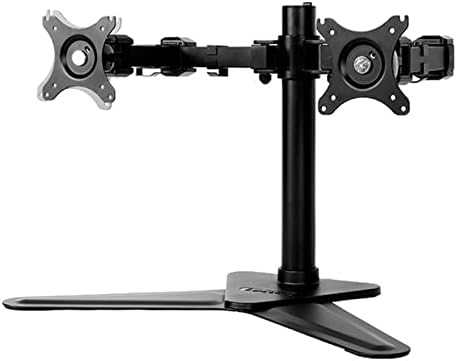
This product is a freestanding dual monitor stand, not a standing desk or converter. Its distinct angle is capacity: two monitors from 10 inches to 30 inches at up to 22 lbs each, 4.4 lbs more per screen than the 17.6 lbs limit on the other arms here. Height adjusts from 7.8 inches to 13.3 inches, in portrait or landscape.
| Spec | From the listing |
|---|---|
| Screen size range | 10 to 30 inches, for 2 monitors |
| Weight limit | 22 lbs per monitor |
| VESA pattern | 75x75mm or 100x100mm |
| Height adjustment | 7.8 to 13.3 inches |
| Tilt range | -85 degrees to -15 degrees |
| Material | Heavy-duty steel |
2. VIVO 32-Inch Desk Converter With Mount — Best Overall

The VIVO is a converter with a built-in dual monitor mount, so screens and surface rise together through a 4.5 inch to 20 inch range. Its top measures 31.5 inches by 15.7 inches, the listing states the desktop holds 33 lbs, and a 31.3 inch keyboard tray sits below. The mount fits two screens from 13 inches to 30 inches.
| Spec | From the listing |
|---|---|
| Top surface | 31.5 x 15.7 inches |
| Height adjustment | 4.5 to 20 inches |
| Desktop weight limit | The listing states 33 lbs |
| Screen size range | 13 to 30 inches, for 2 monitors |
| Per-screen weight limit | 17.6 lbs each |
| Color | Black |
3. SFOIMO Freestanding Dual Monitor Stand — Best for Smaller Screens

Like the uhyOHF, this SFOIMO product is a freestanding stand rather than a desk, so it changes screen position only. Its range is narrower: two screens from 15 inches to 27 inches at 17.6 lbs per arm, with 75x75mm and 100x100mm VESA patterns. It stands apart on articulation, with tilt from +90 degrees to -90 degrees, 180 degree swivel, and 360 degree rotation.
| Spec | From the listing |
|---|---|
| Screen size range | 15 to 27 inches, for 2 monitors |
| Weight limit | 17.6 lbs per arm |
| VESA pattern | 75x75mm and 100x100mm |
| Tilt range | +90 degrees to -90 degrees |
| Swivel and rotation | 180 degree swivel, 360 degree rotation |
| Base | Larger steel base |
4. Mount-It! 36-Inch Desk Converter — Best for Wide Screens

The Mount-It! converter carries the largest screens here, with a dual mount for monitors up to 32 inches and the widest converter top at 36 inches. Height adjusts from 6.5 inches to 16.3 inches by manual lift gas spring, and the listing states the desktop supports up to 33 lbs with 17.6 lbs per arm. Its 36.0 by 25.75 inch footprint needs a deeper desk than the VIVO.
| Spec | From the listing |
|---|---|
| Top width | 36.0 inches |
| Overall size | 36.0 x 25.75 inches, 16.5 inches high |
| Height adjustment | 6.5 to 16.3 inches |
| Desktop weight limit | The listing states 33 lbs |
| Per-arm weight limit | 17.6 lbs per monitor arm |
| Unit weight | 46.05 pounds |
5. Generic Electric Desk With Monitor Riser — Best Full Desk

This is the only complete electric desk here, with a 47.24 inch by 23.62 inch desktop that rises as one surface. An integrated elevated riser forms a dual-tier layout described for dual monitors, a laptop, and paperwork. A digital display panel stores 2 memory presets, so seated and standing heights can be recalled directly.
| Spec | From the listing |
|---|---|
| Desktop size | 47.24 x 23.62 inches |
| Maximum height | 43.31 inches |
| Memory presets | 2 presets, digital display panel |
| Unit weight | 57.76 pounds |
| Color | White |
| Size name | X-Large |
Buying Checklist
- Measure your monitors first: size in inches, weight in pounds per screen, and VESA pattern, 75x75mm or 100x100mm.
- Decide between a full desk, a converter, and a mount only, and confirm the product lifts your work surface if standing is the goal.
- Compare the height range against seated and standing elbow heights, and check stated desktop and per-arm limits before adding a laptop.
- Measure your desk against converter footprints such as 36.0 x 25.75 inches, leaving room for the tray.
- Check assembly and cable routing, including whether clips, a tray, or a riser are included.
- Compare 2 or 3 finalists on screen range and lift span, and check the return window.
FAQ
How do I know if my monitors fit these mounts and converters?
Check three numbers per monitor: screen size in inches, weight in pounds, and VESA pattern in millimeters. The mounts here cover 10 to 32 inches, per-screen limits of 17.6 lbs or 22 lbs, and 75x75mm or 100x100mm patterns. A monitor outside any one figure is outside the stated fit.
What is the difference between a converter and a freestanding monitor stand?
A converter such as the VIVO or Mount-It! lifts the whole work surface, tray included, through a range such as 4.5 to 20 inches or 6.5 to 16.3 inches. A freestanding stand such as the uhyOHF or SFOIMO lifts only the screens while the desk stays fixed. To stand, you need a converter or a full electric desk.
Can one desk hold two large monitors plus a laptop?
It depends on width and stated limits. The Generic desk offers a 47.24 inch surface described for dual monitors, a laptop, and paperwork, while the Mount-It! top is 36.0 inches wide and the VIVO top is 31.5 inches wide. Add your screen and laptop widths, then check them against surface width and the stated 33 lbs limit where given.
Final Verdict
For an existing desk, the VIVO converter is the most balanced route, with a 15.5 inch lift span, a 31.5 inch top, and a tray. The Mount-It! suits 32 inch monitors and a wider surface, at the cost of a narrower lift range. The Generic desk suits anyone replacing a desk who values 2 stored heights over independent arms. The uhyOHF and SFOIMO stands work only as mounts, the first ahead on capacity at 22 lbs per screen, the second on tilt range.
Prime covers fast, free delivery on eligible items. See whether a Prime free trial is available for your account.
Check Prime on Amazon →Related Guides
Product and ASIN Reference
| Product | ASIN | Buy |
|---|---|---|
| uhyOHF Monitor Mount Dual Monitor Stand | B0F5WT4FHB | View on Amazon |
| VIVO Standing Desk Converter with Dual Monitor Stand | B08RHKKX6K | View on Amazon |
| SFOIMO Monitor Stands, Dual Monitor Desk Stand | B0FS6RBT26 | View on Amazon |
| Mount-It! Standing Desk Converter Dual Monitor | B0728H2YP5 | View on Amazon |
| Generic Electric Standing Desk with Monitor Riser | B0H1W3JLZM | View on Amazon |








Write Your Review
No reviews yet. Be the first to share your experience!