
If you need the widest surface for three screens, choose an adjustable riser, if you need your desk surface back, choose a clamp mount, and if you need the screens themselves, choose the monitor trio. None of the five products here is a full desk with legs and a desktop of its own.
Two are risers on a desk you already own, two are mounts that lift monitors off that desk, and one is a set of three monitors with no desk, riser, or mount in its listing details. Each plays a role in computer desks for triple monitors setup planning, but none replaces it.
As an Amazon Associate, we earn from qualifying purchases.


Pick by Your Need
- Best overall: WESTREE Triple Dual Monitor Stand Riser. Widest span here, 29 to 56 inches, plus a 13 inch drawer.
- Best for freeing desk surface: HUANUO Triple Monitor Mount. Fits 13 to 27 inch monitors, with 12.2 inches of height adjustment.
- Best for starting without screens: Kado Triple Monitor 3-Pack. Three 27 inch monitors at 1920×1080 resolution.
- Best for mounting choice: MOUNTUP Triple Monitor Mount. C-clamp and grommet mounting, plus a quick-release VESA plate.
- Best for two height settings: Fenge Triple Monitor Stand. Heights of 2.4 and 6.3 inches, and a 9.25 inch fabric drawer.
Quick Answer
Start with the WESTREE riser for the longest platform, at 29 to 56 inches, plus storage. Choose the HUANUO or MOUNTUP mount if desk depth is tight and you would rather suspend three screens. Pick the Kado trio only when monitors are missing, since it adds no desk or support surface.
Comparison Table
| Product | Best for | Key dimension or spec | One trade-off | Buy |
|---|---|---|---|---|
| WESTREE Triple Dual Monitor Stand Riser | Widest platform | Length 29 to 56 inches | Riser only, not a desk | View on Amazon |
| HUANUO Triple Monitor Mount | Lifting screens off desk | 13 to 27 inch screens, 12.2 inch height adjustment | Mount only, no drawer | View on Amazon |
| Kado Triple Monitor 3-Pack | Supplying the screens | Three 27 inch monitors, 1920×1080 each | Monitors only, no desk or mount | View on Amazon |
| MOUNTUP Triple Monitor Mount | Clamp or grommet mounting | Up to 27 inches, pole height 16.93 inches | Mount only; arms adjust differently | View on Amazon |
| Fenge Triple Monitor Stand | Two heights plus drawer | Length 30.8 to 44.5 inches, heights 2.4 and 6.3 inches | Narrow 9.3 inch depth, shorter than WESTREE | View on Amazon |
Decision Guide
Start with which piece of a triple-screen workstation you are missing.
If you have no monitors yet, choose the Kado trio. Its three 27 inch panels are the only screens here; every other product assumes you already own displays.
If your desk surface is crowded, choose a mount. The HUANUO fits screens from 13 to 27 inches with VESA patterns of 75x75mm or 100x100mm and desk thicknesses from 0.39 inches to 3.15 inches. The MOUNTUP also fits screens up to 27 inches and offers C-clamp or grommet mounting. Check each monitor for a VESA pattern first; a screen without those holes cannot attach as described.
If you prefer monitors standing on the desk, choose a riser. The WESTREE spans 29 to 56 inches, 11.5 inches more at maximum than the Fenge range of 30.8 to 44.5 inches. The Fenge answers with two heights, 2.4 and 6.3 inches, and a 0.47 inch panel.
If storage matters, choose between the two risers. The WESTREE drawer is 13 inches and the Fenge drawer is 9.25 inches, a difference of 3.75 inches. The mounts include cable management instead, and the Kado monitors include neither.
Finally, check weight figures as given. The HUANUO name states 19.8 pounds, while the Fenge listing states a maximum of 30kg or 66lbs for the whole stand. Those describe different things, so do not treat them as interchangeable.
1. WESTREE Triple Dual Monitor Stand Riser — Best overall
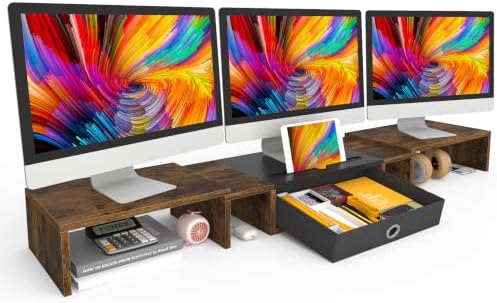
This riser is not a desk. Its distinct angle is span: the length adjusts from 29 inches to 56 inches, wider than the Fenge maximum of 44.5 inches, and the angle adjusts plus or minus 90 degrees so side sections can turn toward the center. A 13 inch slide-out drawer and a slot for a phone and tablet add storage the mounts do not offer, and the unit weighs 11.97 pounds in Rustic Brown.
| Spec | From the listing |
|---|---|
| Adjusted length | 29 inches to 56 inches |
| Angle adjustment | Plus or minus 90 degrees |
| Drawer | 13 inches, slide-out |
| Color | Rustic Brown |
| Size | Large-brown |
| Weight | 11.97 pounds |
2. HUANUO Triple Monitor Mount — Best for freeing desk surface

This mount is not a desk either. It lifts three screens off the surface, the opposite approach to the risers. It fits monitors from 13 to 27 inches, states a 19.8 pound holding figure, and offers 360 degree rotation, plus or minus 90 degree swivel, and plus or minus 45 degree tilt. Height adjustment covers 12.2 inches, and the clamp range covers desk thicknesses from 0.39 inches to 3.15 inches.
| Spec | From the listing |
|---|---|
| Screen size range | 13 to 27 inches |
| Height adjustment | 12.2 inches |
| VESA patterns | 75x75mm or 100x100mm |
| Desk thickness range | 0.39 inches to 3.15 inches |
| Color | Black |
| Package dimensions | 15.91 x 12.68 x 7.87 inches |
3. Kado Triple Monitor 3-Pack — Best for starting without screens

This product does not match the desk part of the keyword at all. It is a set of three monitors, not a desk, riser, or mount. Each panel is 27 inches at 1920×1080 resolution with a 75Hz refresh rate and a 100% sRGB color gamut figure. Each monitor measures 24.13 inches wide, 14.23 inches high, and 1.75 inches deep, and weighs 10.6 pounds, so three across need about 72.39 inches of combined panel width before angled positioning.
| Spec | From the listing |
|---|---|
| Screen size | 27 inches, 3-pack |
| Resolution | 1920×1080 |
| Refresh rate | 75Hz |
| Panel dimensions | 24.13 x 14.23 x 1.75 inches |
| Weight | 10.6 pounds |
| Color | Black |
4. MOUNTUP Triple Monitor Mount — Best for mounting choice

Like the HUANUO, this is a mount rather than a desk, but its angle is mounting flexibility. It fits flat or curved displays up to 27 inches, from 17 inches up, and mounts by C-clamp or grommet, with a quick-release VESA plate per screen. The arms tilt plus or minus 90 degrees, swivel plus or minus 90 degrees, and rotate 360 degrees, while the center screen height adjusts separately from the 2 side spring arms. The unit weighs 12.35 pounds and its pole height figure is 16.93 inches.
| Spec | From the listing |
|---|---|
| Screen size | Up to 27 inches |
| Tilt and swivel | Plus or minus 90 degrees each |
| Rotation | 360 degrees |
| Mounting | C-clamp or grommet |
| Height | 16.93 inches |
| Weight | 12.35 pounds |
5. Fenge Triple Monitor Stand with Drawer — Best for two height settings

This stand is a riser for a desk you already own, not a desk itself. It differs from the WESTREE with two set heights, 2.4 inches and 6.3 inches, and its length adjusts from 30.8 inches to 44.5 inches with an angle range of minus 90 degrees to plus 90 degrees. The panel is MDF at 0.47 inch thickness, the listing states a maximum weight of 30kg or 66lbs, and the fabric drawer measures 9.25 inches. At 9.25 pounds, it is the lightest support product here.
| Spec | From the listing |
|---|---|
| Length range | 30.8 inches to 44.5 inches |
| Heights | 2.4 inches and 6.3 inches |
| Panel thickness | 0.47 inch, MDF |
| Drawer | 9.25 inches, fabric |
| Maximum weight | The listing states 30kg or 66lbs |
| Weight | 9.25 pounds |
Buying Checklist
- Measure desk width and depth, then compare with the 29 to 56 inch WESTREE span, the 30.8 to 44.5 inch Fenge span, and the 24.13 inch width of each Kado panel.
- Add up three monitor bases or panels, including any side angle, before choosing a riser or mount.
- Check each monitor for VESA patterns of 75x75mm or 100x100mm for a mount, and measure desk thickness against the clamp range.
- Compare limits in matching terms: the listing states 19.8 pounds for HUANUO and 30kg or 66lbs as the Fenge maximum.
- Confirm what the product is: this group contains 2 risers, 2 mounts, and 1 monitor set, and none is a complete desk.
- Check the return window on the product page, especially if your screens are near the 27 inch limit shared by both mounts and the Kado panels.
FAQ
How wide does a desk need to be for three 27 inch monitors?
Each Kado panel is 24.13 inches wide, so three in a line total about 72.39 inches, while angling the side panels reduces that width. A riser must also fit on the desk, and the widest option here adjusts to 56 inches, so the desk needs to be at least that long.
Should I choose a riser or a mount for three monitors?
Choose a riser for a raised platform and a drawer, as with the 13 inch WESTREE drawer or the 9.25 inch Fenge drawer. Choose a mount when surface space matters more than storage and your monitors have VESA patterns of 75x75mm or 100x100mm. Both mounts fit screens up to 27 inches.
Does any product in this group replace a desk?
No. Two are risers on an existing desk, two are mounts that clamp or bolt to an existing desk, and one is a set of three 27 inch monitors. You still need a desk underneath, sized for the riser, clamp, or panel width you choose.
Final Verdict
For most desks, the WESTREE riser is the simplest fit, with a 29 to 56 inch span and a 13 inch drawer. The Fenge is the alternative when two heights, 2.4 and 6.3 inches, matter more than length. If surface space is the problem, the HUANUO and MOUNTUP mounts solve it from above, if your screens have the needed VESA patterns. Treat the Kado trio as a screen purchase, paired with a desk, riser, or mount chosen separately.
Prime covers fast, free delivery on eligible items. See whether a Prime free trial is available for your account.
Check Prime on Amazon →Related Guides
Product and ASIN Reference
| Product | ASIN | Buy |
|---|---|---|
| WESTREE Triple Dual Monitor Stand Riser with Drawer | B09X5SX3QP | View on Amazon |
| HUANUO Triple Monitor Mount | B0CHMPTPW4 | View on Amazon |
| Kado Triple Monitor 3-Pack | B0DSTGZ1NY | View on Amazon |
| MOUNTUP Triple Monitor Mount | B087BWV232 | View on Amazon |
| Fenge Triple Monitor Stand with Storage Drawer | B0CB5QRXGR | View on Amazon |










Write Your Review
No reviews yet. Be the first to share your experience!